
Learn English, Spanish: Learna
Deep Flow AppsEducation
4.66.11K Reviews
- Version
- 4.0.2
- Installs
- 50.00M
- Age Rating
- Everyone
Screenshots

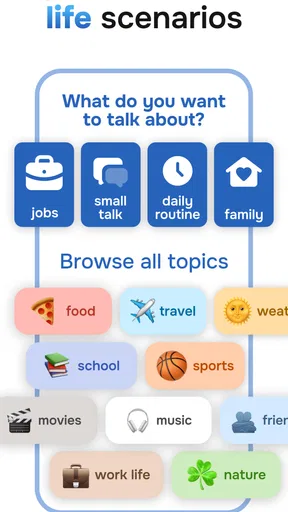

Our Review of Learn English, Spanish: Learna
 Analysis by Appyee
My first useful goal with Learn English, Spanish: Learna would not be mastering a language in a week. I’d use it to turn short, otherwise idle moments into regular practice: a few minutes with vocabulary, a quick review before a conversation, or a low-pressure way to get started again after a break. That is the kind of routine a phone-based language app can support well, as long as I treat it as practice rather than a substitute for every kind of learning.
What to expect from a phone-based tutor
Learna is an education app from Deep Flow Apps, focused on learning English and Spanish with AI. It is free to install, with in-app purchases ranging from $0.99 to $199.99 per item, so I would check what is included before committing to a paid option. The app is rated for Everyone. Its average rating is 4.6 from around 410,000 ratings, and it has over 10 million installs, which suggests it has reached a broad audience without telling me whether it will suit my particular learning style.
The main appeal is convenience. A phone is already close at hand, and a short lesson can feel easier to begin than opening a textbook or arranging a formal class. That makes Learna a sensible fit for someone building a habit, refreshing familiar words, or looking for a first step before speaking more often. It is less likely to satisfy a learner whose priority is a complete academic course, detailed teacher feedback, or sustained conversation with a fluent speaker.
I’d also keep expectations grounded around the word “AI.” It may make practice feel more interactive, but an AI-based learning experience is not automatically the same as a human tutor correcting every nuance. If I need careful feedback on an accent, professional writing, or a high-stakes exam, I would pair an app with a teacher, class, or trusted reference rather than relying on one tool alone.
Getting Started with Learna
First off, getting started with Learna is a breeze. The interface is sleek and intuitive, making navigation as easy as pie. As soon as you dive in, the app greets you with a quick quiz to gauge your level. This helps tailor the learning experience right from the get-go.
Make the first session count
For a first-time user, I’d approach the opening quiz as a placement aid, not a judgment. Answer from what I can actually do without guessing based on words that merely look familiar. If the result seems too easy or too difficult, that is useful feedback: I can adjust how I use the lessons instead of assuming the first recommendation must be perfect.
Before beginning, I’d decide which language matters most right now. Someone learning Spanish for an upcoming trip may want practical expressions and listening confidence, while a person improving English for everyday conversation may need repeated exposure to common phrases. Trying to advance in both languages at once can be appealing, but it can also split attention. Starting with one clear purpose makes it easier to notice whether the practice is helping.
A realistic first success is modest: finish a short activity, remember a handful of useful words, and be able to recall at least one later without looking. I would stop there rather than turning the first visit into a marathon. A small win is more likely to make me return the next day, and consistency matters more than a burst of enthusiasm that is difficult to repeat.
Features That Stand Out
One of the coolest features is the bite-sized lessons. These are perfect for squeezing in some learning during a coffee break or while waiting for the bus. The app uses a mix of audio, visuals, and interactive exercises that keep things interesting. No more dozing off during lessons!
To get more from those short sessions, I’d use the different formats for different jobs rather than treating them as interchangeable. Audio is useful when I want to hear a phrase, visuals can help anchor a new word to a situation, and interactive exercises give me a reason to retrieve what I just encountered. A practical routine is to listen once, answer without rushing, then say the phrase aloud if the setting allows. That last step turns recognition into a small speaking rehearsal.
There is a trade-off, though: quick exercises can make progress feel smooth even when recall is still fragile. Getting an answer right immediately after seeing it is not the same as remembering it tomorrow. I’d revisit material after a gap and notice which words I can produce from memory. If I keep missing a phrase, I’d make a personal note of it and use it in a sentence of my own, rather than simply tapping through the next activity.
The app also boasts a community feature where you can chat with other learners. It's like having a global classroom at your fingertips. Engaging with others not only boosts your learning but also keeps you motivated. Plus, you might just make a new friend or two.
I’d treat community chat as a place to practise taking conversational risks, not as a guarantee that every correction will be authoritative. A useful approach is to write a simple message using words from a lesson, then ask a focused question if something is unclear. That gives the exchange a learning purpose and makes it less intimidating than trying to hold a long conversation immediately. Anyone who prefers private study can skip social interaction and still use the app’s other learning activities.
A routine that fits around real life
Imagine I’m waiting for a bus after work and have a few minutes before it arrives. Instead of opening a feed, I complete one short lesson, listen closely to a phrase, and try to say it from memory while walking to the stop. Later that evening, I return to the phrase and see whether I still remember it. That sequence is more useful than doing several activities hurriedly without checking what stuck.
For a more demanding routine, I’d attach practice to a daily event that already happens: after breakfast, during a quiet commute, or just before closing my laptop. I would keep the target small enough to survive a busy day. If reminders help, they can prompt the habit; if they become noise, I’d change or ignore them rather than letting a notification turn language learning into another source of guilt.
It is also worth separating quiet practice from speaking practice. On a crowded bus, listening with headphones or answering a visual exercise may be comfortable, while repeating phrases aloud may not be. At home, I can use the same material more actively by speaking, recording myself separately if I want to compare attempts, or making up a short exchange. Matching the activity to the setting prevents an otherwise useful app from feeling awkward to use.
Tracking Your Progress
Tracking progress is another area where Learna shines. The app provides detailed stats on your learning journey, showing you how far you’ve come and where to focus next. It’s super satisfying to see those numbers climb, and it definitely gives you that extra push to keep going.
I’d use the stats as a planning aid, not as a verdict on my ability. A streak or completed activity can show that I showed up, but it cannot by itself prove that I can follow a conversation or remember vocabulary under pressure. To make progress more meaningful, I’d periodically test myself without hints: explain a familiar topic in a few sentences, recall useful phrases before opening a lesson, or try to understand a short spoken exchange.
That distinction helps answer a common question: is Learna enough to become fluent? I would not assume that any single app can guarantee fluency. It can provide structured practice and help make study regular, but real conversation, varied listening, reading, and feedback all matter too. I’d see the app as one part of a learning plan, with the right balance depending on whether my goal is basic travel confidence, everyday conversation, or a more advanced level.
And let me tell you, the app’s reminders are a real lifesaver. They give you a little nudge just when you’re about to forget to practice, ensuring you stay on track.
Reminders work best when they support a routine I have chosen. I’d start with a time when I can realistically pause, then judge whether the nudge leads to actual practice. If I regularly dismiss it, the problem may be timing or an oversized daily goal, not a lack of motivation. A shorter session at a better moment is a more useful adjustment than piling on reminders.
Where it fits among language-learning options
Compared with a textbook, Learna is easier to dip into and offers audio and interactive practice in the same mobile setting. A textbook may be better when I want a stable explanation of grammar, a clear page to annotate, or a longer sequence I can follow offline from the page itself. Compared with a live tutor, an app is more flexible and less socially demanding, but a tutor can respond to my individual mistakes and keep a conversation moving in a way a prepared activity may not.
It also sits differently from a dictionary or translation app. Those tools are helpful when I need to check one word quickly, but they do not necessarily build a regular study routine. Learna makes more sense when I want guided practice over time. If I only need a translation for a message today, opening a translator is the faster choice; if I want to practise forming and understanding phrases, a lesson-based app is more relevant.
For a first-time learner, that comparison suggests a practical combination: use Learna for regular guided sessions, keep a dictionary or reference nearby for questions that need a precise answer, and seek real conversation when confidence allows. I wouldn’t add every resource at once. One main practice tool and one reliable reference are usually easier to sustain than a collection of apps competing for attention.
Content and Variety
The variety of content is impressive. From vocabulary and grammar to conversational practice, Learna covers all the bases. The app even includes cultural tips, which I find particularly enlightening. It’s not just about learning words; it’s about understanding the context and culture behind them.
That range is useful when I connect each activity to something outside the screen. For example, after studying a conversational phrase, I might use it to prepare for ordering food or greeting a new colleague. After a cultural note, I’d think about when the advice applies rather than memorizing it as a universal rule. Language and culture vary by place and situation, so I’d treat tips as context to consider, not instructions that cover every speaker.
What’s more, the app regularly adds new content, so there’s always something fresh to explore. This keeps the learning experience dynamic and engaging.
Fresh material is appealing, but I’d avoid chasing novelty at the expense of review. A good personal workflow is to explore a new topic only after checking whether an older one still feels familiar. If I discover that new lessons are easy but older phrases disappear from memory, I’d spend the next session revisiting earlier material. That keeps variety from creating the illusion that moving forward is the same as retaining what I learned.
Choosing the right pace and expectations
People often wonder whether a free app means every useful feature is free. Learna is free to install, but it also offers in-app purchases, with listed items ranging from $0.99 to $199.99. I’d review the purchase details in the app before paying and decide what learning problem the purchase would solve for me. If I’m still unsure whether I enjoy the teaching style, I’d first spend time with the available free experience rather than paying simply because I hope a purchase will create a habit.
The app is a better match for learners who like phone-based, bite-sized study and want an approachable way to practise English or Spanish. It may be a weaker fit for someone who needs a fixed classroom syllabus, individual correction from a human instructor, or deep grammar explanations as the main focus. It is also not ideal if notifications and app-based tracking make learning feel pressured; a paper notebook, a book, or a scheduled class may feel calmer and more motivating.
There is no need to use every feature every day. I’d choose a simple pattern: one lesson, a short recall check, and occasional conversation practice when I have the chance. If progress stalls, I’d change the practice—not just increase the time. More listening, more spoken output, or a slower review of difficult words may address the problem better than repeating activities I already find easy.
Wrapping It Up
In a nutshell, Learn English, Spanish: Learna is a fantastic app for anyone looking to dive into language learning. It’s user-friendly, packed with features, and constantly evolving. Whether you’re a newbie or looking to brush up on your skills, this app is definitely worth checking out.
My recommendation comes with one practical condition: decide what success looks like before you begin. It might be remembering useful travel phrases, feeling less hesitant when speaking, or simply getting back into a study habit. The app’s release date is September 24, 2024, and its current version is 2.2.3; it requires Android 7.0 or later. Those details make it straightforward to check compatibility, while the more important decision is whether short, guided practice suits the way you like to learn.
Ready to give it a go? You might just find yourself speaking like a local sooner than you think!
Privacy and Permissions
See what permissions an app requests and how it handles your data.
- Photos/Media/Files
- read the contents of your USB storage, modify or delete the contents of your USB storage
- Storage
- read the contents of your USB storage, modify or delete the contents of your USB storage
- Camera
- take pictures and videos
- Microphone
- record audio
- Wi-Fi connection information
- view Wi-Fi connections
- Other
- view network connections, pair with Bluetooth devices, full network access, change your audio settings, run at startup, control vibration, prevent device from sleeping, Google Play license check, read Google service configuration
Verdict
Strengths of Learn English, Spanish: Learna
- Intuitive interface enhances user experience.
- Wide range of languages and levels available.
- Interactive exercises keep learning engaging.
- Regular updates with new content.
- Offline access for learning on the go.
Limitations of Learn English, Spanish: Learna
- Limited free content, subscription required.
- Ads can be disruptive during lessons.
- Pronunciation tools need improvement.
- Some lessons feel repetitive over time.
- Occasional bugs in the app functionality.
Other Releases by Deep Flow Apps
View All
IQ Masters - Brain Games
Education4.2

Nerd AI - Tutor & Math Helper
Education4.6

Retake AI: Face & Photo Editor
Photography3.7

Chat AI: Ask Agent Anything
Productivity4.5
Similar Picks in This Category
View All
Duolingo: Language Lessons
Duolingo4.7

Google Classroom
Google LLC2.8

Unacademy: Learn & Crack Exams
Unacademy3.2

Bible App for Kids
Life.Church4.4

Cake - Learn English & Korean
Cake Corp.4.7

Brainly: AI Homework Helper
Brainly4.5
Frequently Asked Questions
What languages can I learn with the Learna app?
Learna currently offers courses in English and Spanish. The app is designed to help users from beginner to advanced levels, utilizing interactive lessons, quizzes, and real-life conversation practice to enhance learning. It’s ideal for both casual learners and those seeking more structured language proficiency.
Is the Learna app suitable for all age groups?
Yes, Learna is designed to be user-friendly for all ages. It features age-appropriate content, ensuring a safe and engaging learning experience for children, teens, and adults. The app's intuitive interface allows users of any age to navigate lessons easily and track their progress.
Does Learna require an internet connection to use?
Learna requires an internet connection for initial downloads and updates, but many features are available offline. This allows users to continue learning on the go, without the need for constant connectivity, making it perfect for traveling or areas with limited internet access.
Are there any subscription costs associated with Learna?
Learna offers both free and premium subscription options. The free version provides access to basic lessons, while the premium subscription unlocks advanced features, ad-free content, and personalized learning plans. Users can choose monthly or yearly plans based on their learning needs.
How does Learna personalize the learning experience?
Learna uses adaptive learning technology to tailor lessons to individual user needs. Based on initial assessments and ongoing progress, the app adjusts difficulty levels and suggests materials, ensuring a customized learning journey. Users receive regular feedback to help optimize their language learning.
